
What is POS? How is POS currently applied? What is the abbreviation for POS? How to use POS? And which bank’s POS machine has the lowest fee? … are some questions that many readers have asked Star Express.
Through the following content, we will answer and send you detailed information about a type of cash register that is widely used in modern business. Let’s follow along!
What is POS?
The POS system helps record product information, calculate total amount, manage inventory, and provide business reports.
This can be understood as a point of sale system, including: Handheld POS machine (card payment), POS cash register (operational management).
What is POS?
The trend of using “cashless” payments is increasing and POS machines are becoming more popular than ever.
We can easily see POS machines when making payments at supermarkets, stores, and cafes. From large-scale business areas such as restaurants, garden cafes, franchise models, chain stores to small individuals, POS machines are a great choice.
What is POS (Point of sale) or POS System?
POS is the abbreviation of the word “Point of sale” which can be roughly translated as point of sale. Initially, POS only meant a machine that accepts ATM card payments or is also known as an ATM card swiping machine.
However, in recent years, along with the development of sales management solutions, POS (POS terminal) is also understood as a sales machine used to run cash register software, print invoices (POS system) that we often see in supermarkets, restaurants, cafes
To ensure profits and control the amount of goods sold, each point of sale system always includes a system or tool to record daily transactions such as notebooks, Excel files or more advanced is a cash register system.
By equipping and using a cash register system or POS software, business owners can strictly manage goods, cash, limit loss of goods, meet the shopping and payment needs of customers. Customers can shop and pay quickly, efficiently and professionally at these locations with these systems.
The POS system not only refers to the point of sale but also to the service sector (Point of service). It is also a way to attract customers to come back to buy. Therefore, the POS system can also include additional functions such as inventory management, warehouse management, CRM and accounting.
A modern point of sale system includes software, hardware and additional functions.
What types of POS machines are there?
So do you know what types of POS machines are available today? If not, you can refer to the popular types of POS machines currently used in practice below:
Currently, POS machines are developed in a very diverse way to meet many different usage needs. Therefore, different types of machines have been born instead of the traditional type as before. Currently, there are 2 popular types that perform payment functions: mobile POS machines and electronic POS machines.
Mobile POS (handheld POS)
This is the most popular type designed based on the first version of the POS machine. You can easily find this type of machine in small and medium-sized stores to support a variety of payment methods.
Handheld/mobile POS machines are often compactly designed, fit in the palm of your hand, have a touch screen, and integrate the function of printing invoices with sales management software and use a battery and a sim card to connect to the internet to operate and transmit data.
The machine is commonly used in small and medium-sized stores such as mini supermarkets, grocery stores, retail stores selling cosmetics, fashion, accessories, etc.
Advantages
Compact design, can be carried with you, helping you sell anytime, anywhere.
Manage finances, enter goods quickly and easily.
Easy to use, high durability, saving investment costs for the store.
Create a professional image, save time, improve customer experience.
Disadvantages
Must regularly change the battery.
Using a sim card to connect to the Internet, sometimes there is a slow connection or connection error.
Electronic POS machine
Electronic POS machines are similar to mobile POS machines, they are considered an upgraded version of mobile POS machines, also a device used to calculate money, store sales data.
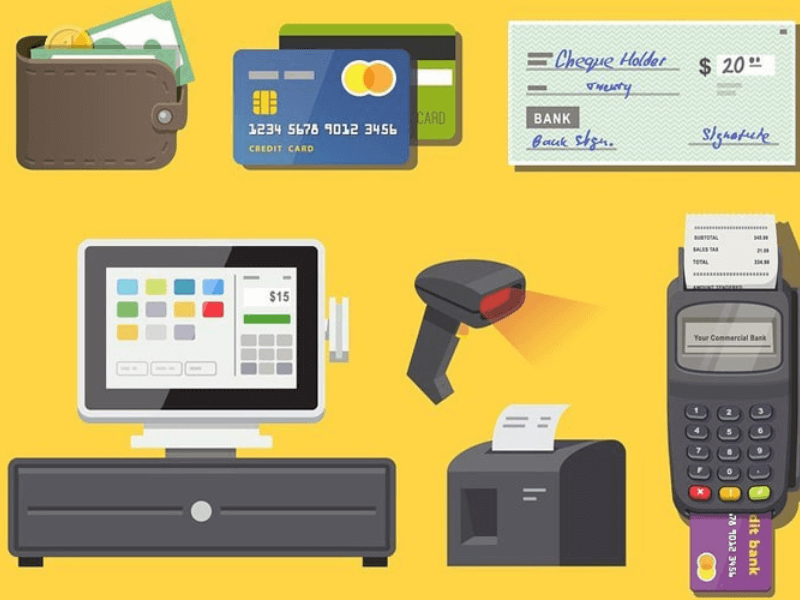
However, this type of machine is often much larger in size, can be combined with devices such as barcode readers, retail receipt printers, credit card payment machines and cash drawers…
These types of machines are often permanently equipped for large stores, restaurant chains, supermarket chains… Moreover, electronic POS machines will have 1 screen and 2 screen types for you to choose from.
Advantages
Simple, easy to use.
Virus-free.
Commonly used in supermarkets, shops, restaurants, hotels, karaoke …
Used for simple needs of printing invoices, paying money …
Disadvantages
Heavy, difficult to move.
Does not provide sales reports such as inventory, debt …
Cannot manage business online.
Relatively high price (about more than 10 million VND), very few places have the conditions to equip.
What are the benefits of POS machines in today’s business?
Handheld POS machines are one of the modern payment tools, helping consumers to pay expenses including household bills, shopping bills, consumer loans … through their bank cards.
Currently, the handheld POS machine network system is extremely large, meeting the maximum payment needs of consumers.
Using a handheld POS machine at low cost (POS machines are formed with a dense network, distributed throughout shopping points across the country; proving to be quite advantageous with different payment functions and extremely reasonable costs)
Quick sales with simple operations
Avoid mistakes when ordering, the POS management software has a pre-saved list of dishes in the restaurant. Employees only need to choose from the available system to help minimize errors and mistakes.
Speed up the service process, employees do not waste time on manual tasks thanks to the support software, will operate faster. This also helps to improve the customer experience.
Diverse types of cards participating in payment
Regardless of whether it is a magnetic strip card or a chip card, you can still pay quickly.
Flexible cost policy
Good management of products, restaurant business needs to put the quality of food and raw materials first. The software will help you manage your warehouse by recording the time of import and inventory of each raw material for you to use appropriately. Minimize the risks of expired food that negatively affects the reputation of the restaurant.
Superior technology controls all activities such as revenue, warehouse, import, sales on phones, or iPads, storing all information using cloud computing.
Endless data storage capacity, you no longer have to worry about risks if you lose your books.
Calculating costs, reporting quickly and easily, exporting files easily.
Cloud computing sales management software helps you synchronize goods quickly if suddenly there is a network outage, still selling easily.
Manage customer and supplier debts
Ability to accumulate points to create customer incentive programs.
Security features with authorization mode. Helps you control employees or all activities more secretly than traditional management.
Better customer care, after dining at the restaurant, customers can also collect information, survey satisfaction, receive vouchers, coupons for future visits. These can be planned and carried out smoothly with the support of POS software.
In addition, to take advantage of all the features and utilities brought by this service, businesses must have a business registration license.
As for cardholders, they only need to own one of the payment cards to have easy transactions. And payment via POS machine will bring benefits to both parties as follows:
For card accepting units
Helps improve business efficiency and attract a large number of customers. In addition, it also helps to diversify
payment methods for customers to choose from.
Reduce cash management costs and minimize the risk of counterfeit or torn money. Limit fraud during cash counting and save costs on personnel and transaction time.
Revenue can be easily managed through the bank’s transaction reporting system. At the same time, it makes it easier to check daily sales activities and closely monitor revenue so that sales programs can be changed promptly.
Create the image of a professional, modern organization that is suitable for the current cashless payment trend in Vietnam and the world.
Equipment for both wireless and wired POS machines can be provided free of charge. In addition, initial training on usage instructions for sales and cashier departments is also free.
Maintenance and support services provided by the bank are often quick and timely.
Fast payment transaction processing time through the device is about 4 seconds/transaction. At the same time, the amount of money customers pay will be transferred directly to the unit’s account opened at the bank, ensuring safety when receiving money.
For customers
The POS machine accepts all types of domestic and international cards in the Napas alliance, so customers can make payments using any type of card.
Cardholders no longer have to carry cash when paying at the store, helping to ensure your financial safety, limiting the risk of losing or having money stolen.
Criteria for choosing a POS machine
Choosing a POS machine to use is extremely difficult. Therefore, there are also criteria for choosing to buy a quality handheld POS machine
In the “matrix” of handheld POS machines, how to choose a POS machine that is suitable for the business model, has good quality at a reasonable cost?
Let’s learn about the following criteria for evaluating the quality of POS sales machines:
Handheld POS machine design
In addition to the issues of design and color, compact size is very important. The machine does not take up too much space, employees can easily carry POS machines to the customer’s table to pay.
A piece of advice for shop owners is to use POS cash registers with touch screens and integrated thermal printers. This type of machine is modern and suitable for most current business models, although it has many functions but does not bring a feeling of bulkiness and complexity.
Touch POS machine configuration
Prioritize choosing machines with fast processing speed, this is extremely important when you need to pay for many orders (when there are many customers, holidays, weekends, etc.).
A slow, hanging POS cash register will reduce the professionalism of your store and reduce the effectiveness of customer service.
The optimal configuration of the touch POS cash register for stores is 1GB Ram + 8GB ROM with a processing speed of 1.3ghz.
Ability to connect to peripheral devices
In addition to wifi, 4G, bluetooth connections, some cash registers today also support 4G SIM connection, helping the machine to always be connected to the internet. Payment becomes fast, safe, minimizing unwanted problems.
POS sales machine integrated with management software
This is the point that makes touch POS cash registers increasingly popular. The cash register software for each POS machine will help you manage products, report statistics… Thereby helping you control and limit losses to avoid budget loss.
For the smart handheld POS machine to maximize its effectiveness, store owners should connect the machine to sales management software to optimize features suitable for most current business models such as retail, food and beverage service, karaoke, etc.
Compact, convenient
Store owners should choose POS machines that are compact, lightweight and easy to move, avoiding buying heavy handheld POS devices that require wired connections. By using a wireless touch POS machine, employees can go to each table and order directly for customers, avoiding congestion when ordering, reducing the processing speed of departments such as the kitchen or bar.
In addition, handheld POS machines also help customers order and pay right at the table, helping to improve the quality of customer care services.
Easy to use
The way to use POS machines is generally quite simple, user-friendly, new employees only need about 15 minutes during training to grasp the process of ordering – printing invoices for customers proficiently, accurately and quickly.
Print invoices
Currently, smart handheld POS machines can print invoices directly on the machine, helping payment operations to be more synchronized and efficient. When printed, invoices need to show the order name, store name, product price, order date, payment amount.
Along with that are other accompanying details such as the name of the employee performing the transaction, payment method, store address, transaction code, etc.
Use rechargeable batteries
Choosing POS machines with battery charging mode will be very convenient